๐Ÿฆ Free tool ยท runs in your browser

Reconcile your bank statement to your ledger โ€” free, in minutes.

Drop in your book ledger and your bank statement. QuickInflo auto-matches what it can, you tick the rest, and it shows your adjusted balances tying out โ€” with a zero-variance close and a locked audit trail. Nothing is uploaded; your data stays in your browser.

Auto & manual matching ยท carry-forward B/F ยท multi-currency ยท CSV & Excel ยท zero-variance close & lock ยท 100% in your browser.

How it works

Three steps to a clean reconciliation.

No new accounting system. It reads the two files you already have.

1

Load your two files

Your GL / book ledger and your bank statement export โ€” CSV, XLSX or XLS. Map the columns once and it remembers.

2

Auto-match, then tick the rest

QuickInflo pairs entries by reference and amount automatically. For the rest, tick GL and bank rows (totals must agree) and match.

3

Review & close

See your adjusted book and bank balances tie out. Close the period at zero variance โ€” it locks so nothing can change after.

Why QuickInflo

Everything you need to tie out a period โ€” nothing you don't.

๐Ÿ”’

100% private

Runs entirely in your browser. Your ledger and statement are never uploaded to any server.

โšก

One-click auto-match

Pairs entries by reference + amount instantly, so you only handle the exceptions.

โœ…

Manual matching

Tick one or more rows on each side โ€” totals must agree โ€” then match. Split and grouped matches supported.

๐Ÿ”

Carry-forward B/F

Unmatched items (deposits in transit, uncleared cheques) roll into the next period until they clear.

๐ŸŒ

Multi-currency

Reconcile SAR, USD, EUR and more โ€” per account and half-month period.

๐Ÿ’พ

Saved & sequence-numbered

Save a reconciliation and reload later to continue; matched items are remembered.

๐ŸŽฏ

Zero-variance close

You can't close until every matched item ties out to the last halalah โ€” no 0.01 differences slip through.

๐Ÿ”

Locked after submit

Once a period is closed it's read-only โ€” a clean, tamper-evident audit trail for review.

See it in action

From two files to a period that ties out.

Real screens from the tool โ€” loading files, matching, and the reconciliation summary. Click any image to enlarge. Illustrative sample data shown.
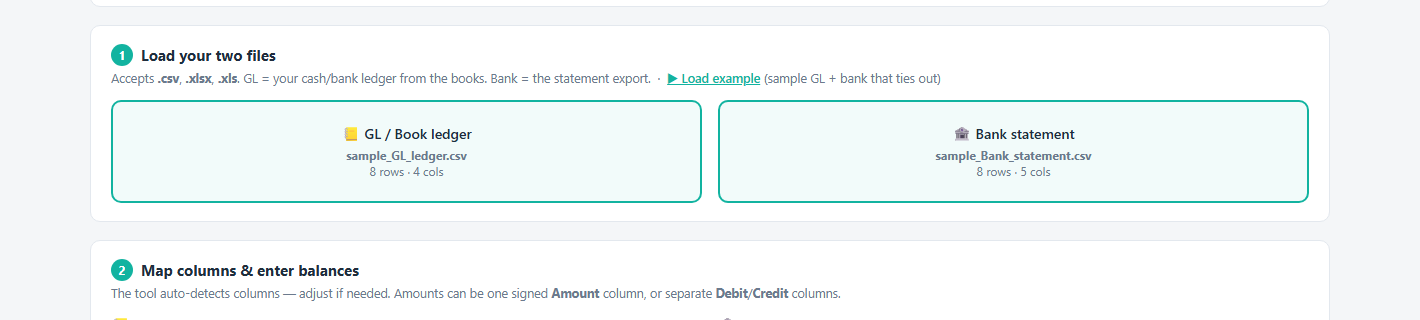
Load your GL ledger and bank statement

Load your two files

Drop your book ledger and bank statement โ€” CSV, XLSX or XLS. Columns are mapped once and remembered.
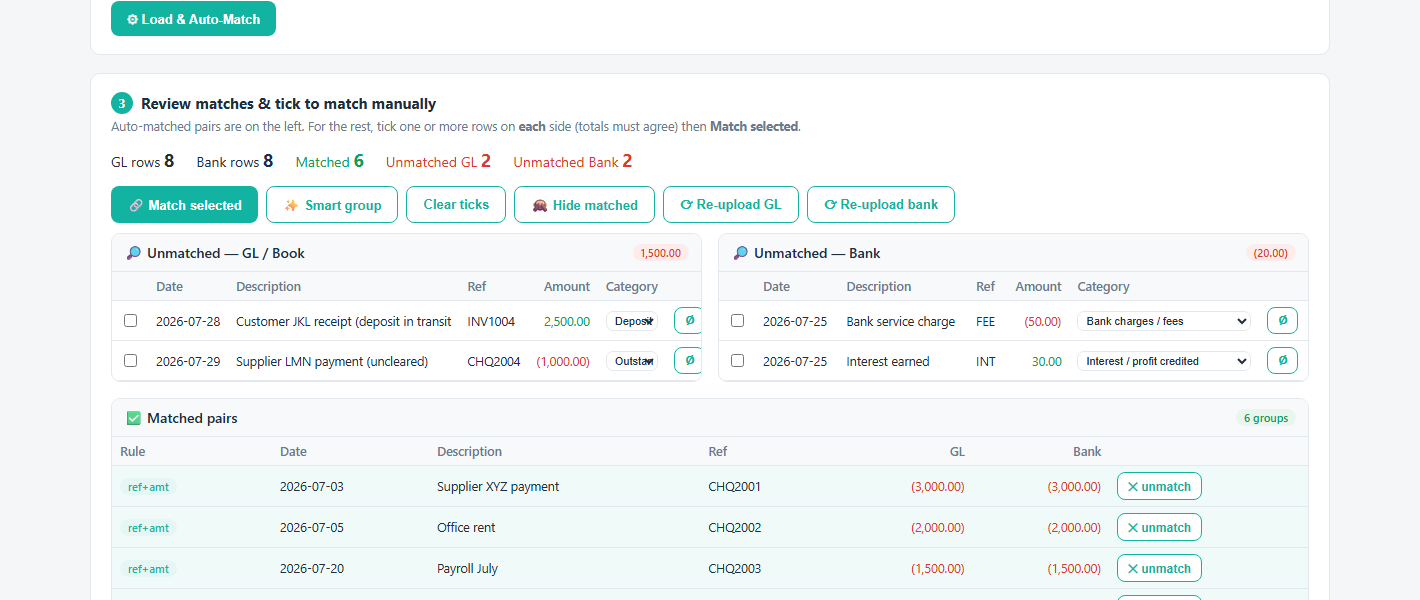
Review matches and match manually

Auto-matched + manual

Auto-matched pairs on the left; tick the remaining GL and bank rows (totals must agree) to match.
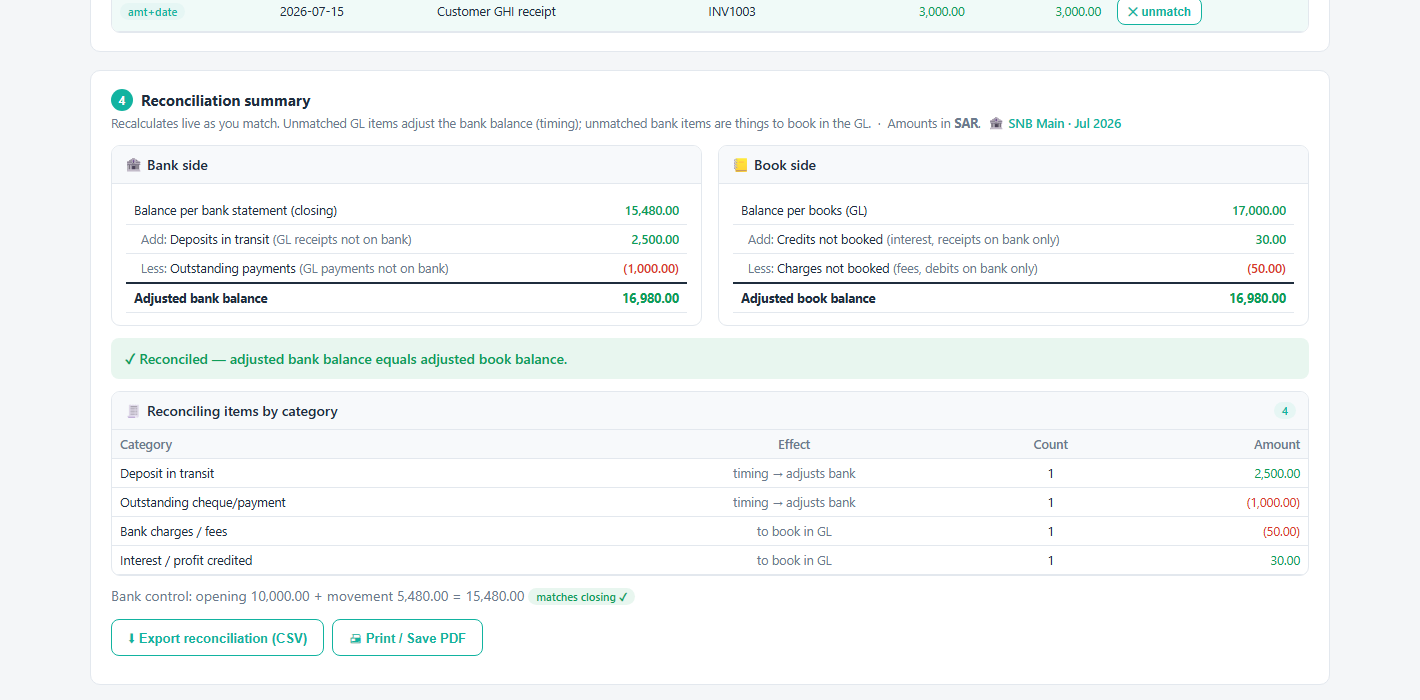
Reconciliation summary with adjusted balances

Balances that tie out

Adjusted book vs bank balance, outstanding items by category, and export to Excel / PDF.
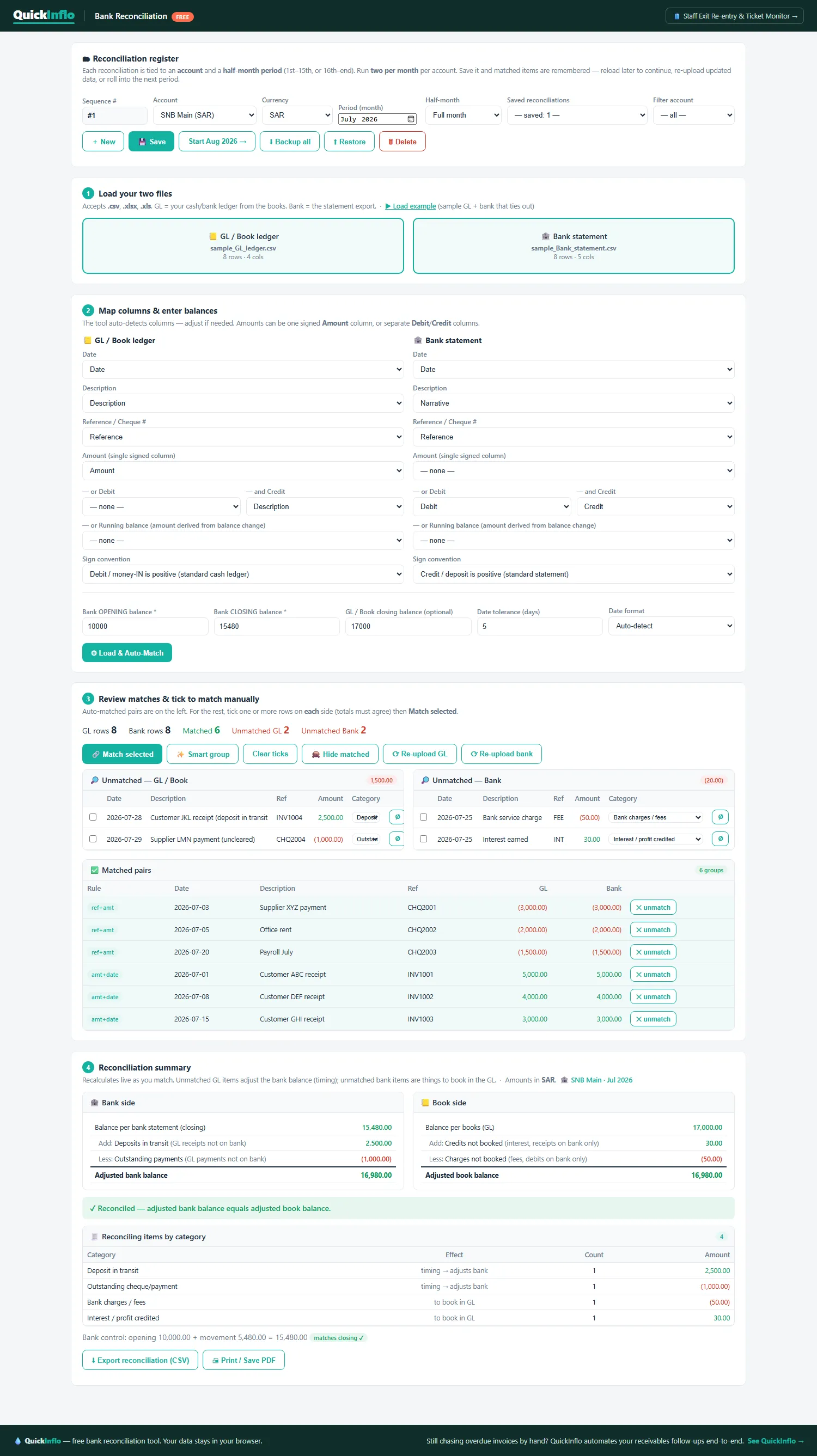
Full bank reconciliation workflow โ€” register, load, map, match and summary

The whole workflow on one screen

Reconciliation register ยท load & map ยท auto/manual match ยท adjusted-balance summary ยท export. Click to view full size.

Accuracy you can sign off

Zero-variance close, then locked.

Built for accountants: a reconciliation is only finished when it's exactly right โ€” and stays that way.

โœ“
Exact-match enforcement

Every matched pair must agree to the halalah โ€” a 0.01 difference blocks the match.

โœ“
Adjusted balances must agree

Book and bank adjusted balances have to tie out before the period can be closed.

โœ“
Close = lock

Once submitted, the reconciliation is read-only โ€” no edits, re-matches or deletions.

โœ“
Audit trail

Closed periods keep who/when and a full list of matched and outstanding items.

โœ“
Carry-forward integrity

Outstanding items roll forward untouched until they clear in a later period.

โœ“
Export for the file

Export the signed-off reconciliation to Excel, CSV or PDF for your records.

Pricing

Free. No signup.

The bank reconciliation tool is free โ€” our way of saying hello. It runs in your browser with no account and no limits. Love it? Our Collections and e-Invoicing tools are how we keep the lights on.

โ–ถ Launch the free tool

Bundle it with the AR tool for 15% off both.  ยท  See QuickInflo Collections โ†’

FAQ

Common questions.

Is my data safe?

Yes โ€” the tool runs entirely in your browser. Your ledger and statement are read locally and never uploaded to any server.

What files can I load?

CSV, XLSX or XLS for both the GL / book ledger and the bank statement. You map the columns once and it remembers them.

Do I need an account?

No. It's free with no signup โ€” just open it and load your two files.

Can I reconcile multiple accounts and currencies?

Yes โ€” each reconciliation is tied to an account, currency and half-month period, and you can run as many as you need.

What happens to items that don't match?

They stay as outstanding and carry forward (B/F) to the next period until they clear โ€” deposits in transit, uncleared cheques, and so on.

Can I edit a reconciliation after closing it?

No โ€” once you close a period at zero variance it's locked read-only, giving you a clean audit trail. Start the next period to keep going.

Reconcile your first account in minutes.

Free, private, and no signup. Load your ledger and bank statement and watch it tie out.

โ–ถ Launch the free tool
×Enlarged screenshot